This Instruction document was completed as part of an assignment for ENC 3241-Writing for the Technical Professional coursework.
Instructions for Creating a Will via WealthCounsel
This aid provides instructions for creating a Will document for an existing client in WealthCounsel software.
Step 1. Go to WealthCounsel website: www.wealthcounsel.com. Click Login (Figure 1).
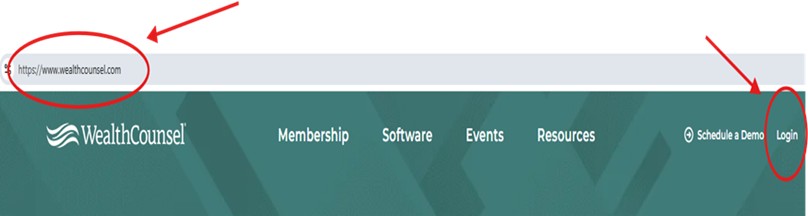
(Figure 1. Website home page. Screenshot by Barbara Gunter)
Step 2. Type In Username and Password. Click Sign In (Figure 2).

(Figure 2. Sign in page. Screenshot by Barbara Gunter)
Step 3. Click Solutions on the menu bar Home page (Figure 3).

(Figure 3. Menu bar home page. Screenshot by Barbara Gunter)
Step 4. Click Customization from the available drop-down menu (Figure 4).
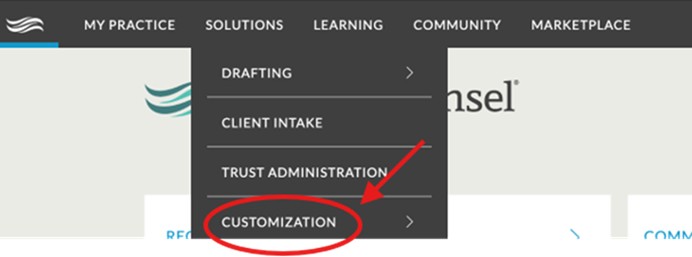
(Figure 4. Solutions dropdown menu. Screenshot by Barbara Gunter)
Step 5. Click Scenarios from the available menu (Figure 5).

(Figure 5. Click Scenarios. Screenshot by Barbara Gunter)
Step 6. Click the ”+” sign to create the Will on My Firm’s Scenarios page at the far right of the page (Figures 6, 7)
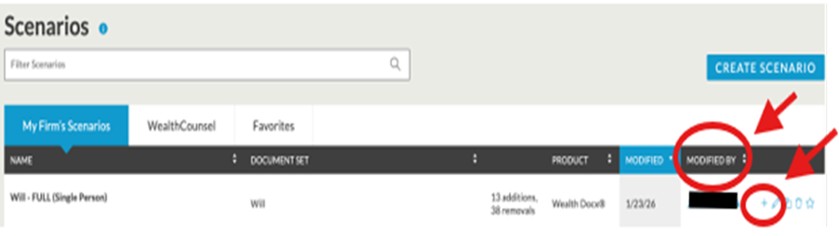
(Figure 6. My Firm’s Scenarios page. Screenshot by Barbara Gunter)

(Figure 7. Close-up My Firm’s Scenarios “+” icon. Screenshot by Barbara Gunter)
Step 7. After clicking on the ”+” sign, the Create Document screen opens. (Figure 8).
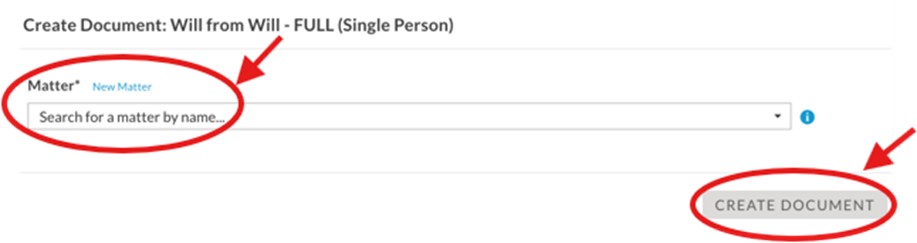
(Figure 8. Create Document. Screenshot by Barbara Gunter)
Step 8. Begin by typing in the client matter name, when the name is recognized, it will appear in the box.
Step 9. Click Create Document once the client matter name appears correctly in the box.
Step 10. Once created, the document will pop-up as a downloadable file on your computer.
Step 11. Open the file and save it onto your computer using MS Word software.
Step 12. Save your file download in this format: last name, first name, middle initial, template type, year created.
Ex: Doe, John. J. Will 2026.
Step 13. Edit the document to incorporate client matter specific information.